
Image SEO Audit: The Complete 2026 Guide
Learn how to run a complete image SEO audit in 2026, alt text, file names, Core Web Vitals, schema, and more, with a practical step by step checklist.
AI Summary
Learn how to run a complete image SEO audit in 2026, alt text, file names, Core Web Vitals, schema, and more, with a practical step by step checklist.
Images quietly cost more than you think. A 2026 audit of real client sites at F9XR showed that images made up 37% of total page weight on average. Before any compression work, a single content page often shipped 2-4 MB of images alone. And yet, images are also one of the highest impact, most overlooked technical SEO exercises on any website. This guide walks you through a complete image SEO audit: why it matters, exactly what Google and AI search tools look at, an eight step audit you can run today, and a checklist you can reuse on every site.
Why Image SEO Deserves a Dedicated Audit
Images deserve their own audit because of the compounding impact: the hidden load they put on speed, the ranking signals they carry, and the fact that most sites have dozens or hundreds of images that have never been reviewed.
- Google Images is a search engine in its own right. Roughly 22.6% of all Google searches are image searches, and Google Images is the largest image search engine on the web. Every image on your site is a potential entry point for a customer who is shopping, comparing, or researching, and image SEO determines whether those entry points exist.
- Image optimization is a Core Web Vitals lever. Images drive three of the four Core Web Vitals metrics: LCP (largest contentful paint, usually the hero image), CLS (layout shift, often caused by images without dimensions), and INP (delayed by heavy image work on the main thread). As of 2026, roughly 54.6% of mobile pages still fail Core Web Vitals, and images are the most common, most fixable cause. We covered the full mobile story in our article on why your website should be mobile first.
- Images are a huge and silent page weight problem. On an average content page, images account for 37% of total weight before optimization. Pages routinely ship 2-4 MB of images, and that weight directly taxes loading speed, mobile data plans, and your Core Web Vitals score. The good news: image optimization is one of the most predictable wins in SEO. Good image SEO typically cuts page weight 50-80% with no visible quality loss.
What Google (and AI Search Tools) Actually Look At
Google Images has a well documented set of signals, and in 2026 AI search tools add a new layer. ChatGPT, Gemini, and Claude can read images directly, which makes image understanding a growing part of visibility beyond traditional search.
- Image file names and alt text. A descriptive file name like
nikon-z50-review-front-angle.jpgtells search engines what the image shows. Alt text does the same job in a natural sentence, and it is also a hard accessibility requirement for screen readers and an accessibility evaluation point under the WCAG guidelines. - Image quality and usefulness. Google treats images with real informational value better than generic decorative ones. A sharp, correctly exposed photo of your actual product or location consistently outperforms stock filler.
- Page context and relevance. The page title, headings, captions, and surrounding text tell Google what an image is about. An image of a studio apartment only helps you rank for “one bedroom apartment rent” if the page actually talks about it.
- Page speed and user experience. Heavy images slow down the whole page, and slow pages rank worse. This is why image SEO overlaps so heavily with Core Web Vitals optimization.
- Structured data. Marking images up with ImageObject schema and connecting them to your page’s structured data helps Google understand their role. We broke down the full schema setup in our guide to essential .txt files for SEO, AEO, and GEO.
- AI readability. AI tools increasingly read and describe images directly when deciding what to cite. Descriptive alt text, clear captions, and well structured pages make it far more likely that a visual from your site ends up in an AI answer. For the broader picture, see our guide to making your business site visible to AI.
Step by Step: How to Audit Your Website’s Images
Here’s the practical eight step process we use on real client sites. It takes about half a day for a small business site, and it can be automated and compressed to under an hour with the right tools.
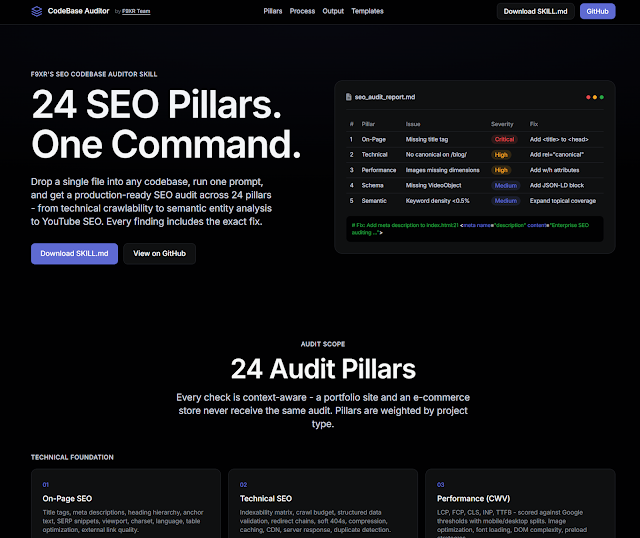
The same audit we ran for this article was generated end to end with the F9XR SEO CodeBase Auditor skill, a free open source skill that reads your entire codebase and writes a full SEO audit report with a priority fix matrix. That is exactly the workflow shown below, which you can run for your own site in a few minutes.
1. Inventory Every Image on Your Site
What to do: Grab your sitemap. If you don’t have one, crawl the site with a tool like Screaming Frog or Sitebulb and export all images. If you’re auditing code directly, list every image reference across your templates and content.
What to fix: Any image that doesn’t need to be there, decorative images that can be moved to CSS, and duplicates of the same asset served under different URLs.
Good outcome: A clean list of every image on the site, with its URL, format, dimensions, and file size.
2. Check File Names
What to do: Rename any files that are auto-generated or meaningless, like IMG_4832.jpg or Screenshot_2026-01-01_at_10.15.22.png. Use descriptive, keyword rich file names like nikon-z50-review-front-angle.jpg.
What to fix: Generic, unreadable, or keyword stuffed file names.
Good outcome: Every image file name tells both users and Google what the image shows at a glance.
3. Fix Alt Text and Titles
What to do: Review every alt attribute. It should be a concise, accurate description of the image in a natural sentence. Keep it under about 125 characters, which is the practical recommendation from the WCAG accessibility guidelines. This is also a trust signal — our E-E-A-T checklist covers the trustworthiness pillar that accurate, descriptive content supports.
What to fix: Missing alt text, keyword stuffed alt text, and alt text that describes nothing or duplicates the title attribute.
Good outcome: Alt text that is useful for screen readers, and naturally descriptive for search engines.
4. Compress and Convert to Modern Formats
What to do: Convert heavy JPEGs and PNGs to modern formats like WebP or AVIF, and run a compressor over anything that’s still needed. WebP is the safe practical default, AVIF where browser support allows.
What to fix: Uncompressed 5-10 MB photos, PNG screenshots that could be WebP, and images that get uploaded at full resolution straight from a camera.
Good outcome: Average savings of 25-35% just from switching JPEG and PNG to WebP, often more with AVIF. Combined with proper sizing, total page weight routinely drops 50-80%. For benchmark context, HTTP Archive tracks median page weight year over year, and images consistently make up the largest single chunk of it.
5. Verify Dimensions and Responsive Sizing
What to do: Make sure every image is served at the size it’s displayed at. A 2,400 pixel wide image displayed in an 800 pixel wide box is wasted bytes on every single page load.
What to fix: Oversized images, missing width and height attributes (which cause layout shift and hurt CLS), and no responsive srcset.
Good outcome: Images that scale to the container with srcset and sizes, and explicit width and height attributes to prevent layout shift.
6. Audit for Broken or Missing Images
What to do: Look for images that return 404, redirect, or fail to load. A broken image is a visible trust problem — it directly lowers your website trust score — and a wasted crawl slot.
What to fix: Dead CDN links, wrong relative paths, moved files, and case sensitivity mismatches.
Good outcome: Zero broken images. Every image returns 200 and displays correctly.
7. Check Core Web Vitals Image Metrics
What to do: Open PageSpeed Insights or the Core Web Vitals report in Search Console and look at LCP, CLS, and INP.
What to fix: A slow LCP image, layout shift from images without dimensions, and lazy loading applied to above the fold images.
Good outcome: LCP under 2.5 seconds, CLS under 0.1, and INP under 200 ms on both mobile and desktop.
8. Add Image Structured Data
What to do: Add ImageObject schema to important images, or at least make sure your images are discoverable through Article schema. We covered the broader structured data setup in our essential .txt files guide.
What to fix: Images not connected to any schema, and pages missing image structured data entirely.
Good outcome: Google understands the role of each image, which improves eligibility for rich results and image search enhancements.
Image SEO Audit Checklist at a Glance
| Audit item | Why it matters | Pass |
| File names | Descriptive names help Google understand the image subject | Descriptive and keyword relevant |
| Alt text | Accessibility plus an image search ranking signal | Present, accurate, under 125 characters |
| Compression | Bigger files slow down LCP and burn mobile data | WebP or AVIF, under 100 KB typical |
| Dimensions | Correct size avoids wasted bytes and layout shift | Matches display size, width and height set |
| Loading | Lazy loading saves bandwidth on long pages | Below the fold images lazy load |
| Broken links | 404 images waste crawl budget and hurt trust | All images return 200 |
| Schema | Helps Google connect images to page context | ImageObject or Article schema present |
| Core Web Vitals | Image metrics directly impact ranking signals | LCP under 2.5s, CLS under 0.1, INP under 200ms |
Common Image SEO Mistakes That Quietly Hurt Rankings
- Ignoring alt text for years. It’s one of the most visible and fixable ranking signals, and accessibility depends on it. A single pass over a site usually catches dozens of images with no alt text at all.
- Uploading camera originals straight to the site. A 12 MP photo can be 5-10 MB. Serve a compressed, sized version and keep the original in storage.
- No width and height attributes. This is a top cause of layout shift (CLS), which is a Core Web Vitals failure and a ranking issue.
- Treating image SEO as a one time task. Sites change, new pages ship, and old images break. Image SEO is maintenance, not a project.
- Lazy loading above the fold images. It often hurts LCP by deferring the very image that defines it. Lazy load below the fold, never the hero.
Practical Tips for Staying On Top of Image SEO Long Term
- Set a rule: every image must be optimized before it goes on the site. A simple checklist catches 90% of image problems at the source, before they ever touch a real page.
- Batch your legacy images. If your site has years of accumulated images, convert and recompress the ones that matter most first: product photos, service pages, and blog heroes.
- Watch your Core Web Vitals report. Search Console flags the exact URLs where LCP, CLS, or INP are failing. Most of the time the fix is an image.
- Revisit on a schedule. Run a lightweight image check every quarter. Keep an eye on Google Images as well, it’s a search engine your competitors often forget.
How F9XR Team Handles Image SEO for Business Websites
- Every image on an F9XR built site passes through the same audit described above: compressed to WebP, properly named, sized, and structured before it ever goes live.
- For existing sites, we run a full image audit like this one and fix everything found, often cutting page weight by half or more.
- Images are treated as a Core Web Vitals investment, not an afterthought. That means correct dimensions, above the fold images prioritized, and lazy loading only where it helps. The mobile first guide explains why that foundation matters.
- The whole image layer is designed so that improvements compound: faster pages, better image visibility, and stronger structured data, together.
Key Takeaways
- Images made up 37% of total page weight on average in real 2026 client audits, and most sites shipped 2-4 MB of images per page before optimization.
- Google Images handles roughly 22.6% of all Google searches, so images are a search engine entry point in their own right.
- Image SEO covers four layers: file names, alt text, file weight and format, and page context through captions and structured data.
- Modern formats and proper sizing routinely cut page weight 50-80% with no visible quality loss.
- Core Web Vitals ties images directly to rankings. LCP, CLS, and INP are all commonly driven by image mistakes.
- Image SEO is a maintenance habit, not a one time project. A quarterly checklist keeps the compounding wins coming.
Conclusion
Images are the web’s quiet infrastructure. They make a site look good, tell your story, and sell your work, but they can also drag down the very performance that determines whether anyone finds the page at all. A proper image SEO audit takes the same assets that were silently working against you and turns them into one of your strongest performance assets.
If running this kind of audit alongside your actual business sounds like a lot, that’s exactly the groundwork teams like F9XR build into website development and website redesign, alongside local SEO, website rentals, and AI visibility optimization. The goal is simple: every image on your site works for you, on page speed, in Google Images, and in the AI answers that increasingly decide which businesses customers choose.
Further Reading
Related Questions

Keywords
Copyright
© 2026 F9XR Team. Licensed under the Creative Commons Attribution 4.0 International License (CC BY 4.0). You are free to share and adapt this work with attribution to the F9XR Team.
Disclaimer
This article reflects the experience and opinions of the F9XR Team and is provided for general informational purposes only. It is not professional legal, financial, or medical advice. Metrics and results mentioned are illustrative and not guaranteed.
F9XR/Articles, published by the F9XR Team, delivers high-quality marketing content produced by staff and contracted experts, unless otherwise noted. This commitment to quality ensures comprehensive coverage of industry topics from a trusted team of writers. For more information, please visit the F9XR Team website or reach out through the contact page.
Ready to Build a Stronger Digital Presence?
The F9XR Team helps business owners turn websites into conversion engines. From website development and redesign to local SEO and AI-powered visibility, we engineer systems that bring in results, not just traffic.
Comments