
F9XR SEO CodeBase Auditor: 24 Pillars, One Command
Use F9XR's free SEO CodeBase Auditor skill to run a 24-pillar SEO audit on your site's source code and get copy-paste fixes. Step-by-step guide.

AI Summary
Use F9XR's free SEO CodeBase Auditor skill to run a 24-pillar SEO audit on your site's source code and get copy-paste fixes. Step-by-step guide.
SEO problems hide in code, not in content. A page can look perfect in a browser and still fail search engines because the title tag is missing, the images have no dimensions, or the schema is invalid. You rarely see those issues on the screen. You see them as rankings that slowly slide, months after a site ships.
This guide shows you how to catch those problems before they cost you. You’ll learn how to use F9XR’s SEO CodeBase Auditor skill to run a 24-pillar SEO audit against your actual source code and get back a report where every finding comes with the exact fix.
Why a Code-Level SEO Audit Beats a Crawler
Most SEO tools crawl the live site. Screaming Frog, Ahrefs Site Audit, and similar products request your URLs over HTTP, parse the responses, and report what they find. That works well for document-based sites. It falls short for modern applications.
Sites built with Next.js, Nuxt, Astro, or React render much of their content through JavaScript. Key DOM nodes appear only after scripts run, and the exact HTML a crawler sees depends on when it samples. A SaaS crawler also runs on a schedule you don’t control. By the time it flags a broken canonical or a noindex leak, the problem has been live for days. Google may already have reprioritized crawl budget away from those paths.
An audit against the source code closes that gap. It runs before deployment, against the exact commit you’re about to ship. It can catch problems that never show up in the rendered HTML at all, like a template that silently drops metadata or a page that generates its title only in client-side JavaScript.
That’s the idea behind the F9XR SEO CodeBase Auditor skill. It gives any AI coding assistant a structured way to read your repository and judge it against 24 SEO pillars, and it returns fixes you can paste straight into your files.

What Is the SEO CodeBase Auditor Skill?
The skill is a single SKILL.md file. You drop it into the root of any codebase, and in any AI assistant that can reference a file, you run a prompt like this:
@SKILL.md Run a comprehensive full-stack SEO audit across all files in this workspace. Generate seo_audit_report.md and seo_audit_report.csv with all 24 pillars evaluated.
The AI then works through the whole repository. HTML, Markdown, JavaScript, CSS, JSON, config files. It maps the file tree, discovers every URL, checks each file against the pillars that apply, and writes seo_audit_report.md plus a CSV export. No API keys. No subscription. No crawler hitting your production server.
It works with Cursor, GitHub Copilot, Claude, ChatGPT, Windsurf, Cline, Aider, and any other assistant that supports file references. The F9XR team released it as open source. You can read the full breakdown on the product page and grab the file from the GitHub repository.
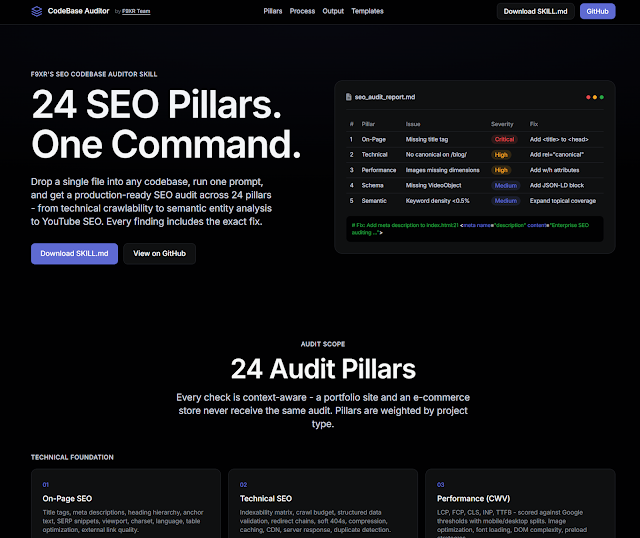
The main difference from SaaS tools: those check what a URL serves. This skill reads what your code contains. So it catches issues before a single page goes live, and it adapts to your stack. A plain HTML site gets a different audit than a Next.js app, which gets a different audit than an Astro site. As Google’s own SEO starter guide makes clear, most of what hurts rankings is baked into how a site is built, not how it’s marketed.
How to Run a Full SEO Audit in Six Steps
Step 1: Download SKILL.md
Head to the GitHub repository, grab SKILL.md. It’s one file of structured instructions. No installation.
Step 2: Drop It Into Your Project Root
Put it next to your index.html, your package.json, or your content directory. That’s the whole setup.
Step 3: Run One Prompt
The full audit prompt is the one above. You can also run focused audits. The skill ships with prompt templates for specific jobs:
- Title tag and meta description optimization
- Core Web Vitals audit across LCP, FCP, CLS, INP, and TTFB
- Rich results eligibility scan
- Internal linking audit
- Competitive gap analysis against specific competitor URLs
- IndexNow readiness check
Step 4: Read the Report
The skill writes seo_audit_report.md in your workspace root. It opens with an executive summary, moves into a Priority Fix Matrix capped at 20 items, then walks through each pillar with the files audited, the issues found, and the fixes. A companion seo_audit_report.csv holds the same matrix for spreadsheet work.
Step 5: Apply the Quick Wins First
Every finding is rated Critical, High, Medium, or Low. The report collects the fast fixes in a “Quick Wins” section: things you can implement in under thirty minutes. Start there. Missing title tags, empty alt text, images without width and height, meta descriptions under 120 characters. Then work through the rest of the matrix by effort and impact.
Step 6: Schedule It, and Consider CI
SEO drifts. Run the audit monthly, or after any big change. If you want to be strict, the skill includes GitHub Actions and GitLab CI templates that run the audit on every pull request and fail the build when Critical issues appear. That turns SEO from a periodic review into a deployment gate.
The 24 Pillars, Grouped Into Four Categories
The pillars are not a random checklist. They sit in four groups, and the skill only applies the ones relevant to your project type.
| Category | Pillars | What It Checks |
|---|---|---|
| Technical Foundation | 1 On-Page, 2 Technical, 3 Performance (CWV), 4 URL Structure, 5 Mobile, 6 Image, 9 Sitemap & Robots.txt | Titles, metadata, indexability, crawl budget, LCP/CLS/INP/TTFB, URL slugs, viewport, alt text, sitemap health |
| Content & Authority | 7 Semantic SEO, 8 Internal Linking, 14 Blog, 16 E-E-A-T, 17 Rich Results, 18 AI/SGE/Voice | Search intent, keyword density, entity coverage, anchor text, Article schema, trust signals, FAQ schema, AI overview readiness |
| Platform & Process | 13 E-Commerce, 15 JS Frameworks, 19 CI/CD, 20 Migration, 21 Content Pruning, 22 Third-Party Scripts | Product schema, SSR vs CSR, audit pipelines, redirect maps, thin content, tag manager and widget impact |
| Specialized | 10 Social & Regional, 11 Security, 12 Accessibility, 23 Competitor, 24 Video & YouTube | OG/Twitter cards, hreflang, NAP, HTTPS, mixed content, ARIA, competitor gap analysis, VideoObject schema |
A portfolio site is not judged on Product schema. A site with no blog skips the blog pillar. The skill weights pillars by project type instead of applying the same defaults to everything.
How the Skill Thinks: The Five-Pass Process
The skill doesn’t dump findings onto the page. It works through five passes:
- Discover. Map the file tree, read config files, identify the framework, find every URL, build an indexability matrix, and flag orphan or unreachable pages.
- Analyze. Evaluate each file against the pillars that apply. Suppress the ones that don’t.
- Prioritize. Sort by severity, then by traffic impact. Keep the Priority Fix Matrix to a maximum of 20 items.
- Report. Write
seo_audit_report.mdfollowing the output blueprint. - Critique. Review the report the way a competitor’s SEO lead would. Every severity label and fix has to be defensible. Drop any finding that’s noise.
That last pass matters. Most AI-generated audits produce false positives. This skill is built around restraint: no finding gets included unless it cites a specific Google guideline, ranking factor, or schema.org specification, and no finding ships without the exact replacement code.
What a Good Finding Looks Like
Every finding follows the same three-part structure. Evidence. Impact. Fix.
Take the sample output on the skill’s product page. A missing title tag on about.html is listed as Critical. The evidence shows the <head> with no <title>. The impact notes that a page without a title has no primary ranking signal and renders as a bare URL in search results. The fix provides the exact <title> tag to paste in.
That format is why the skill works for busy teams. You don’t get a score and a shrug. You get files, line numbers, and corrected code blocks, ordered by what moves rankings most per hour of effort.
How the SEO CodeBase Auditor Improves Your SEO
You catch indexability problems before they ship. A staging noindex leaking into production, a canonical pointing at the wrong URL, a sitemap listing pages that are blocked. These silently eat crawl budget, and they’re nearly invisible to a live crawl. Code-level checks catch them at the source.
Structured data actually works. Schema is easy to write and easy to get wrong. The skill validates JSON-LD against schema.org requirements, checks the required fields for each type, and flags missing rich result opportunities. For a local business, that can mean the difference between a plain listing and a snippet with ratings and an address.
Core Web Vitals get fixed in code, not after the fact. The performance pillar checks LCP candidates, image dimensions, font loading, render-blocking scripts, and DOM size against Google’s official Core Web Vitals thresholds. All of those are fixable in the build, which is far cheaper than optimizing a live site that’s already underperforming.
Internal linking stops leaking equity. The skill maps orphan pages, link depth, anchor text diversity, and silo architecture. Fixing internal links is one of the fastest ranking wins available, and it costs nothing but editing a few templates.
You become ready for AI search. Pillar 18 covers AI Overview extraction readiness, featured snippet targeting, and voice search. Content structured for answer engines is increasingly what ChatGPT and Perplexity cite. The skill checks for definitional answers early in the content, FAQ formatting, and entity richness.
Teams using the skill report cutting audit time from half a day to a couple of minutes. The case study on the skill breaks down those numbers, and the launch announcement explains why F9XR built it open source instead of selling it as another dashboard.

A Practical Example: Fixing Your Own Blog
This blog runs on Jekyll. Before each post goes live, the skill audits the new file against the on-page pillar. Title length, meta description length, heading hierarchy, keyword placement, internal links, FAQ schema. That’s how this post was checked before publishing.
The same workflow works on any content site. Run the audit, take the Quick Wins, and watch the report shrink on the next run. Every run also doubles as documentation, a machine-readable record of what was fixed and when.
The Difference Between an Audit and an SEO Strategy
Be honest about what a codebase audit does and doesn’t do. It fixes technical issues. It won’t replace content strategy, link building, or a well-researched keyword plan. What it does is remove the technical drag so everything else works harder. A great article buried under broken metadata still loses. The same article with a proper title, schema, and internal links actually competes.
Related reading on this site: our guide to free business directories covers the off-site side of visibility, and the F9XR Team introduction explains the full digital presence approach.
If you’d rather hand the audit and the fixes to a team, F9XR offers website development, redesign, local SEO, and digital presence services. There’s also AI visibility optimization if getting cited by answer engines is the goal. You can reach the team here. The skill stays free either way.
Key Takeaways
- The F9XR SEO CodeBase Auditor skill audits your source code, not your live site, so it catches issues before they ship.
- One SKILL.md file in your project root plus one prompt produces a full 24-pillar report with copy-paste fixes.
- Every finding follows an evidence, impact, and fix structure with a severity rating, so you know what to fix first.
- Focused prompts let you audit one area, like Core Web Vitals or structured data, without a full run.
- A codebase audit removes technical drag; pair it with content strategy and link building for the full picture.
Conclusion
SEO debt builds up quietly in the code, and it compounds. A codebase audit catches it early, when a fix costs minutes instead of a full rebuild. The F9XR SEO CodeBase Auditor skill makes that audit a one-command job: free, open source, and compatible with the AI tools you already use.
Run it once on your current project. Fix the Quick Wins. Schedule it monthly. That cycle, repeated, is how sites stop bleeding rankings to issues nobody saw coming.
If you need help implementing the fixes, teams like F9XR specialize in website development, website redesign, local SEO, and digital presence solutions.
Further Reading
Related Questions

Keywords
Copyright
© 2026 F9XR Team. Licensed under the Creative Commons Attribution 4.0 International License (CC BY 4.0). You are free to share and adapt this work with attribution to the F9XR Team.
Disclaimer
This article reflects the experience and opinions of the F9XR Team and is provided for general informational purposes only. It is not professional legal, financial, or medical advice. Metrics and results mentioned are illustrative and not guaranteed.
F9XR/Articles, published by the F9XR Team, delivers high-quality marketing content produced by staff and contracted experts, unless otherwise noted. This commitment to quality ensures comprehensive coverage of industry topics from a trusted team of writers. For more information, please visit the F9XR Team website or reach out through the contact page.
Ready to Build a Stronger Digital Presence?
The F9XR Team helps business owners turn websites into conversion engines. From website development and redesign to local SEO and AI-powered visibility, we engineer systems that bring in results, not just traffic.
Comments