
Google's Preferred Source Button: A Publisher's Guide
Google upgraded its Preferred Sources button in August 2026. Here's how it works, why it matters, and how to add it to your website.
AI Summary
Google upgraded its Preferred Sources button in August 2026. Here's how it works, why it matters, and how to add it to your website.
If you publish content online, blog posts, local news, product guides, service pages, you’ve probably felt the squeeze as AI-generated answers swallow up clicks that used to land on your website. Google knows this is happening too. On August 20, 2026, it rolled out a major upgrade to a tool built specifically to help publishers win some of that direct traffic back.
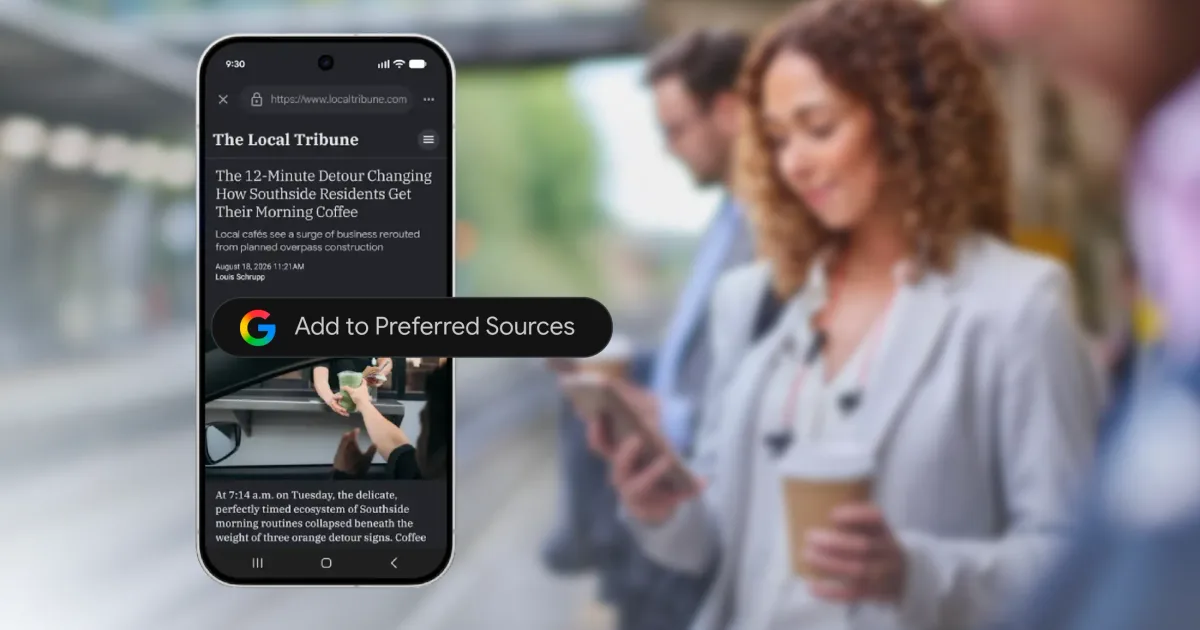
The tool is called Preferred Sources, and the update is simple but useful. Publishers can now embed an interactive button directly on their own website, letting readers flag that site as a trusted source with one click, right where they’re reading, instead of being sent off to a separate Google settings page.
Adoption numbers suggest readers are actually using this. Since the original Preferred Sources feature launched in May 2026, they have selected more than 600,000 unique sources, up from roughly 345,000 just a few months earlier. Google also shared a stat that explains why this matters: people are twice as likely to click through to a source they’ve marked as preferred compared to one they haven’t.
For business owners trying to hold onto direct website traffic in an AI-shaped search environment, this tool deserves attention. Here’s what changed, how it works, and how to add it to your own site.
What Is Google’s Preferred Sources Feature?
Before getting into the August update itself, it helps to understand the feature this builds on.
The Original Launch in May 2026
Google first introduced Preferred Sources in May 2026, giving users a way to personalize their search experience by explicitly marking certain publications as trusted favorites. At launch, this worked through Google’s own interface. A user would search for a news topic, click an icon next to Top Stories, search for and select their preferred sources, then refresh the results to see more links from those chosen sites surfacing more prominently.
The feature originally worked within Top Stories, then expanded in May to also influence AI Mode and AI Overviews. That expansion matters: a user’s preferred sources could now shape which sites Google’s AI-generated answers pulled from and cited, not just which links ranked in traditional results.
What Changed on August 20, 2026
Mrinalini Loew, General Manager of Google’s Search Ecosystem, announced the upgrade: an interactive Preferred Sources button that publishers can embed directly on their own web pages. Previously, marking a site as preferred required a reader to navigate away to Google’s dedicated source preferences page and search for the site by name. Now a reader can click a button right there on the article or homepage they’re already reading, confirm their choice, and land straight back on that same page rather than being routed elsewhere.
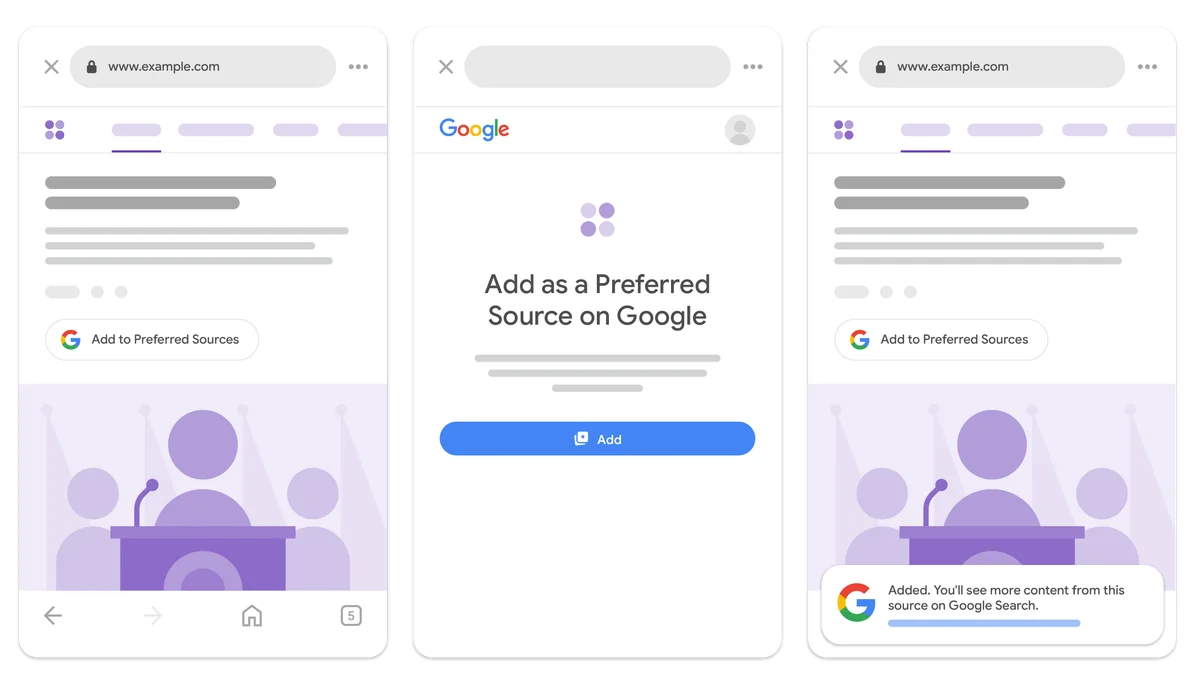
The official embed code, published in Google Search Central's documentation. Image: Google
Google published the new embed code through its Search Central documentation, making it directly accessible to any publisher who wants to add it to their site.
In Google’s own words from the announcement:
Readers more easily find their favorite publications in Top Stories, AI Overviews, and AI Mode, while publishers gain a more seamless way to connect with readers across Google.
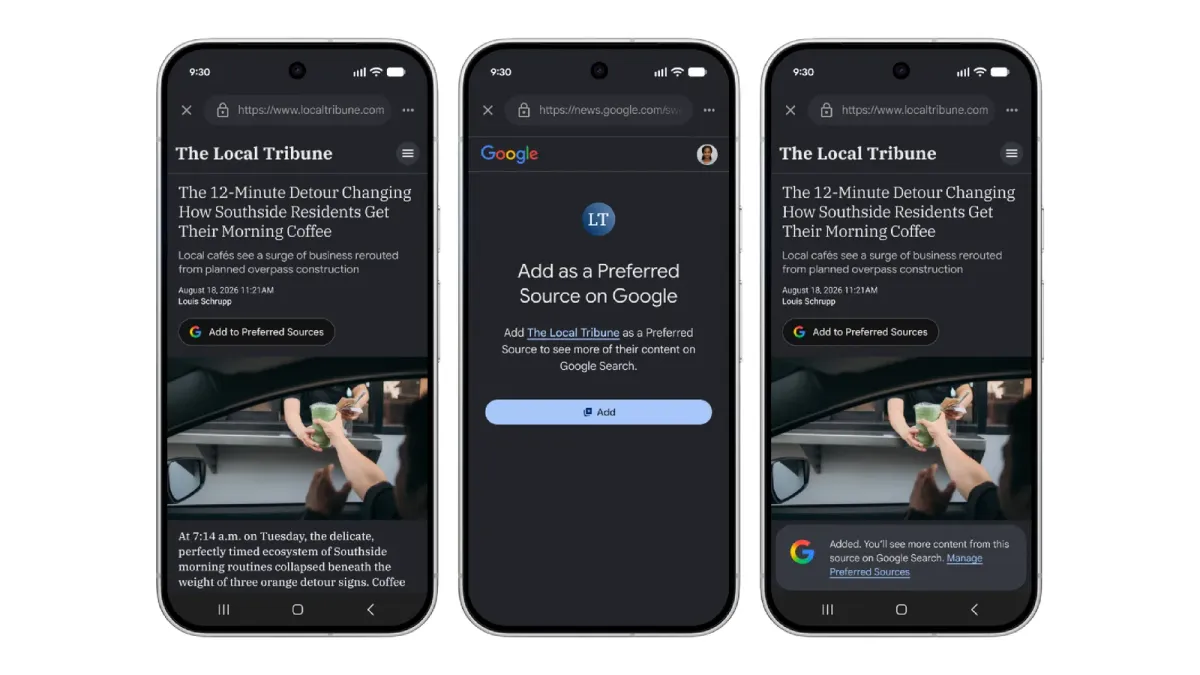
How the button looks across devices. Image: Google
Quick Reference Table
| Detail | Information |
|---|---|
| Original feature launch | May 2026 |
| Update announcement date | August 20, 2026 |
| Announced by | Mrinalini Loew, GM, Google Search Ecosystem |
| What’s new | Embeddable button for publisher websites; readers stay on the same page |
| Where the button code lives | Google Search Central documentation |
| Unique sources selected, May 2026 | Over 345,000 |
| Unique sources selected, August 2026 | Over 600,000 |
| Where it influences results | Top Stories, AI Overviews, AI Mode, Discover, Google News |
| Click-through impact (per Google) | Users twice as likely to click a preferred source |
Why Google Built This: The AI Traffic Problem
The motivation behind this matters if you’re deciding whether to use the tool, so here it is plainly.
AI Search Is Eating Into Referral Traffic
As AI-powered search tools increasingly answer questions directly inside the results page instead of sending users through to the publisher’s site, referral traffic for many content creators has declined. TechCrunch’s coverage of the update was blunt about the framing, describing the button as something Google “threw” to publishers “negatively impacted” by exactly this shift.
We’ve covered the same pattern from the business side before, including why zero-click search makes your Google Business Profile and homepage matter more than ever. Preferred Sources is Google’s most publisher-focused answer to that trend so far.
A Recent Data Point Worth Knowing
Coverage of this announcement also referenced a separate finding from Pew Research: over one-third of web pages published since ChatGPT’s late 2022 release show signs of AI authorship. That statistic describes the environment Google is working in, a web increasingly saturated with machine-written content, where both Google’s ranking systems and its human users benefit from clearer signals about which sources people actually trust.
AI citation patterns are shifting quickly in general. When reporting showed Reddit citations dropping sharply in ChatGPT answers, it became clear that no source’s visibility inside AI answers is guaranteed. Explicit reader signals like Preferred Sources give publishers a small lever they control.
Google Needs This Data Too
There’s another dynamic here, one that surfaced in industry discussion after the announcement. Google’s ranking systems have historically leaned heavily on click behavior and engagement signals to work out which sources are high quality and trustworthy. As AI-generated answers reduce the number of clicks users make on individual links, Google loses some of that natural signal.
The Preferred Sources button hands Google a direct, explicit trust signal from users. It essentially invites people to manually state what the click-through data used to reveal on its own. Search Engine Roundtable and PYMNTS both flagged this tension in their coverage of the launch.
How the Preferred Source Button Works for Readers
Understanding the reader-facing experience explains why publishers should care about adding it.
When a visitor lands on your website and clicks the embedded button, they’re telling Google directly that your site is one they know and trust. Google then uses that explicit signal to personalize that reader’s future results, feeds, and AI-generated answers, giving your content greater visibility whenever it’s relevant to what that person searches for or asks about next.
This works across several Google surfaces at once:
- Top Stories: your content surfaces more prominently within news carousels
- AI Overviews and AI Mode: your site becomes more likely to be cited and linked when Google’s AI generates an answer to a relevant query
- Discover: your content appears more often in that reader’s personalized feed
- Google News: the same personalization applies within the dedicated News experience
The reader keeps full control throughout. They can add or remove preferred sources at any time through Google’s source preferences page, and the whole system is opt-in, based on explicit reader action rather than automatic tracking.
How to Add the Preferred Source Button to Your Website
Here’s a practical walkthrough for publishers and business owners ready to implement this.
1. Get the Embed Code From Google’s Documentation
Google has published the official embed code through its Search Central documentation. That’s the authoritative source for correct, current code, not secondhand versions circulating elsewhere.
2. Place It Where Readers Will Actually See It
Think about placement before you paste anything. Prominent spots work best: near your homepage header, at the end of your most popular articles, or within your site navigation. Returning visitors and new readers both need a natural moment to notice it.
3. Confirm the Redirect Behavior
Part of what makes the August update useful is that clicking the button returns readers to the exact page they were on, instead of dumping them into a separate Google settings flow. Test this yourself after implementation so you know it behaves correctly on your site.
4. Pair It With a Clear Call to Action
This is a new interaction pattern for most readers. A short label near the button, something like “Add us as a preferred source on Google,” helps people understand what clicking actually does before they commit.
5. Watch Search Console Over the Following Weeks
Keep an eye on your performance data after launch. Preferred Sources influence is personalized per reader rather than a universal ranking boost, so track Top Stories, Discover, and AI Overview visibility over time to judge whether the feature is moving traffic for your site. Our guide to SEO metrics beyond rankings covers how to read these signals sensibly.
6. Tell Your Existing Audience About It
Your most loyal readers, the ones already inclined to trust and return to your content, are the most likely to click once they know the button exists. A brief mention in a newsletter, social post, or on-site banner can lift adoption among exactly the audience most likely to help your visibility.
Is It Actually Worth the Effort?
Honest assessment time. There are good reasons to implement this, and reasonable reasons to temper expectations.
The Case For Implementing It
- A confirmed click-through boost: Google’s own data shows people are twice as likely to click through to a preferred source. Even if only a modest share of your audience opts in, it changes how often those readers click.
- Direct influence on AI answers, not just traditional search: as more queries get answered inside AI Overviews and AI Mode, having an explicit mechanism to increase your visibility within those citations stands out. Few publisher-facing tools touch AI answers at all right now.
- Low implementation cost: this is a straightforward embed, not a development project. Smaller publishers and local businesses without dedicated developers can handle it.
- Rapid adoption: growing from 345,000 to over 600,000 unique preferred sources in a few months suggests real reader engagement, not a quietly ignored tool.
The Case for Skepticism
- It shifts responsibility onto publishers and readers. A fair criticism making the rounds after the launch: this asks publishers and readers to manually do what Google’s algorithm used to determine automatically through natural click behavior.
- It won’t fully solve declining AI-driven traffic. Even Google’s own framing treats this as one tool among several, not a fix for the broader referral decline publishers are experiencing.
- Reader adoption requires active promotion. The button does nothing on its own. Without promotion, most of your audience will never notice it exists.
What This Means for Local Businesses and Startups
If you run a local business or startup, this tool might look geared toward large news publishers. The underlying mechanism applies just as well to smaller sites.
For local businesses publishing regular blog posts, resource pages, or community news, the button gives loyal local readers a direct way to boost your visibility in their future searches. It won’t replace strong fundamentals, and understanding how AI picks which local businesses to recommend still starts with consistent business data and genuine reviews. But as a low-cost addition alongside existing efforts, it earns its place.
For startups building an audience through steady content marketing, encouraging early loyal readers to mark your site as preferred could compound nicely as your library grows, especially because the signal appears to influence AI answer citations directly. Pairing the button with the broader steps that make your business site visible to AI search engines covers both sides: being citable, and staying visible to the people who already trust you.
How F9XR Team Can Help
Implementing new visibility tools like this one properly, and pairing them with strong content and technical SEO foundations, benefits from experience rather than a quick copy-paste job.
The F9XR Team helps business owners, startups, and local businesses stay ahead of publisher-facing Google features by offering:
- Implementation support for new Google tools like the Preferred Sources button, embedded correctly and tested on your site
- Content strategy focused on reader trust and engagement, the foundation that makes tools like this effective
- Local SEO strategy that strengthens visibility across Google Search, Discover, and AI-generated answers together, including our dedicated AI visibility optimization service
- Website development and redesign work that keeps your site technically ready as new Google features roll out
- Ongoing digital presence management so your business benefits from new tools without playing catch-up
If you’re unsure whether the Preferred Sources button fits your specific business, or how to pair it with your broader content strategy, that’s a practical question to work through together.
Key Takeaways
- Google announced an upgraded, embeddable Preferred Sources button for publisher websites on August 20, 2026, letting readers mark a site as trusted with one click without leaving the page.
- It builds on the original feature launched in May 2026, which already influences Top Stories, AI Overviews, AI Mode, Discover, and Google News.
- Adoption has grown fast, from over 345,000 unique preferred sources at launch to more than 600,000 by the August update.
- Google’s data shows users are twice as likely to click through to a preferred source, which can lift traffic for publishers who implement and promote the button.
- The feature responds to declining referral traffic as AI-powered search answers queries directly instead of sending clicks to the source.
- Implementation uses Google’s official embed code from Search Central documentation, and promoting the button to loyal readers is what makes it move the needle.
Conclusion
Google’s upgraded Preferred Sources button is a practical addition for any business publishing content online, especially as AI-driven search reshapes how readers discover websites. Implementation costs little, and it carries real, Google-confirmed upside in click-through behavior. It’s also one of the few tools available that gives publishers direct influence over their visibility within AI Overviews and AI Mode.
It won’t single-handedly reverse the referral traffic challenges publishers face, but as part of a well-rounded content and SEO strategy, it deserves implementing and active promotion to your audience. If you want help adding the button to your site, or building a broader strategy across traditional and AI-driven search, teams like F9XR Team work with business owners on exactly this kind of website development, website redesign, and local SEO work.
Produced using AI-assisted research and drafting workflows, then reviewed and edited by the F9XR editorial team. See our Editorial Policy for how we create and verify content.
Further Reading
Related Questions

Keywords
Copyright
© 2026 F9XR Team. Licensed under the Creative Commons Attribution 4.0 International License (CC BY 4.0). You are free to share and adapt this work with attribution to the F9XR Team.
Disclaimer
This article reflects the experience and opinions of the F9XR Team and is provided for general informational purposes only. It is not professional legal, financial, or medical advice. Metrics and results mentioned are illustrative and not guaranteed.
F9XR/Articles, published by the F9XR Team, delivers high-quality marketing content produced by staff and contracted experts, unless otherwise noted. This commitment to quality ensures comprehensive coverage of industry topics from a trusted team of writers. For more information, please visit the F9XR Team website or reach out through the contact page.
Ready to Build a Stronger Digital Presence?
The F9XR Team helps business owners turn websites into conversion engines. From website development and redesign to local SEO and AI-powered visibility, we engineer systems that bring in results, not just traffic.
Comments