
Fake Cloudflare CAPTCHA Scam: Protect Your Website
A fake Cloudflare CAPTCHA scam is tricking visitors into running malware. Here's how it works and how to protect your business website.
AI Summary
A fake Cloudflare CAPTCHA scam is tricking visitors into running malware. Here's how it works and how to protect your business website.
If you have ever landed on a website and seen a box asking you to “verify you are human,” you probably clicked it without a second thought. Cloudflare’s CAPTCHA checks are everywhere, and most of us have learned to trust that little cloud logo. That trust is exactly what a fast-growing scam is exploiting.
Security researchers have been tracking a technique commonly called “ClickFix,” where attackers build a fake Cloudflare verification screen that looks nearly identical to the real thing. But instead of a simple checkbox, it walks the visitor through steps that end with them running a malicious command on their own computer. For business owners, this matters on two fronts. Your customers could be tricked by this scam elsewhere. And if your own website ever gets compromised, this exact type of fake verification screen could end up on your pages, damaging customer trust and your brand’s reputation.
In this guide, we will break down how the fake Cloudflare CAPTCHA scam works, why it is so effective, what warning signs to look for, and what business owners should do to protect both their websites and their customers.
What Is the Fake Cloudflare CAPTCHA Scam?
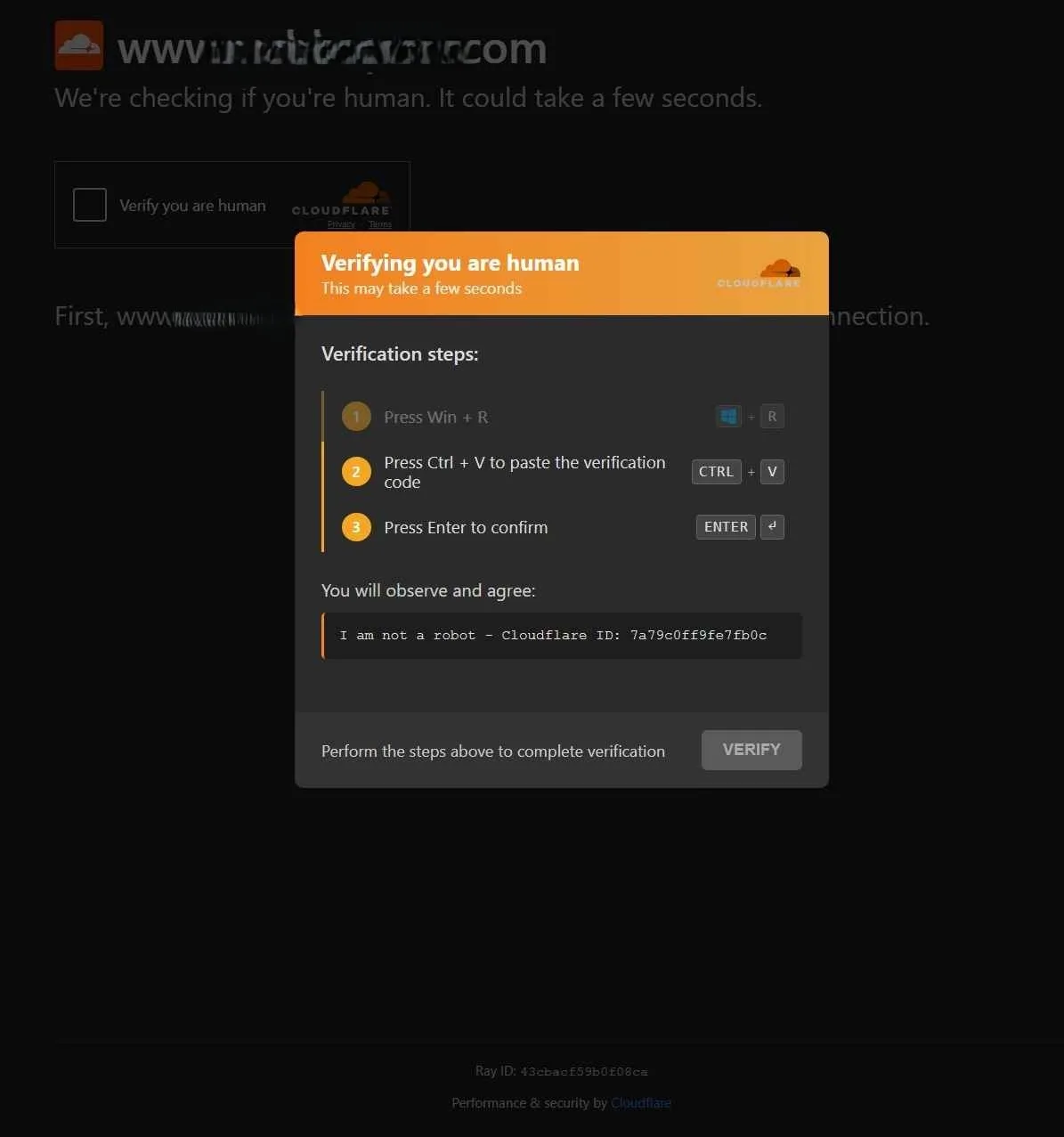
This scam is part of a broader category security researchers call “ClickFix” attacks, first widely documented in 2024 and still actively evolving. Attackers build a webpage or inject a popup that mimics Cloudflare’s legitimate “checking if you’re human” verification screen, complete with the cloud logo, matching colors, and familiar wording.
Instead of a simple checkbox that quietly confirms you are not a bot, the fake version displays a multi-step instruction panel telling the visitor to:
- Press a keyboard shortcut that opens a system dialog box
- Paste something that has already been secretly copied to their clipboard
- Press Enter to “confirm” verification
What the visitor does not realize is that step two pastes a command their own operating system will execute, and step three runs it. This is the entire trick. The attacker never has to convince you to download or open a file. They convince you to run a command yourself, using your own system tools, which lets it slip past many security defenses that watch for suspicious downloads.
Why This Approach Works So Well
A few reasons this scam has spread so fast:
- Visual trust. Cloudflare CAPTCHAs are one of the most recognized security elements on the web, so a convincing copy lowers people’s guard immediately.
- No suspicious download. Because the victim runs the command themselves through a built-in system tool, many antivirus tools do not flag it the way they would a downloaded file.
- Urgency and simplicity. The instructions are short, numbered, and framed as a normal security check, which discourages people from stopping to question it.
- Wide distribution. These fake screens have shown up on compromised legitimate websites, malicious ad networks, phishing emails, and fake software download pages.
How the Fake Screen Differs From a Real Cloudflare Check
| Element | Real Cloudflare Verification | Fake ClickFix CAPTCHA |
|---|---|---|
| User action | Single checkbox click | Multi-step keyboard instructions |
| Asks you to open system dialogs | Never | Yes, typically Win + R or a terminal |
| Asks you to paste anything | Never | Yes, a “verification code” |
| Purpose | Confirms you’re not a bot | Tricks you into running a command |
| Visual design | Consistent, minimal | Often close copy, sometimes with subtle design flaws |
| Appears mid-download or on suspicious pop-ups | Rarely | Frequently |
The biggest giveaway is this: a legitimate CAPTCHA will never ask you to open a Run dialog, a terminal, or paste anything. If a verification screen ever asks you to do that, it is not a real security check, no matter how official it looks.
What Happens If You Fall For It
Once the pasted command runs, it typically downloads and executes malware in the background. The visitor sees little to no visible change, sometimes just a brief flash of a window before it closes. Depending on the specific campaign, the payload can include:
- Information stealers that harvest saved passwords, browser cookies, and session tokens
- Remote access tools that give attackers ongoing control of the device
- Loaders that quietly install additional malware later
For a business, if this happens on a device connected to company accounts, cloud storage, email, or a customer database, the damage extends well beyond one infected computer.
Why This Matters for Your Business, Not Just Individual Users
1. Your Customers Could Encounter It Anywhere
Employees and customers browsing the web on company devices can run into this scam on completely unrelated sites, through malicious ads, compromised pages, or phishing links. A single employee falling for this can put your entire network at risk.
2. Your Own Website Could Be Targeted
If your website has outdated plugins, weak admin credentials, or unpatched software, attackers can inject this exact kind of fake verification screen directly onto your pages. Visitors would then associate the infection with your brand rather than the attacker, causing real reputational and trust damage that can take a long time to repair.
3. It Undermines Trust in Legitimate Security Tools
The more these scams spread, the more people start second-guessing real Cloudflare checks, real CAPTCHAs, and real security prompts. That can quietly increase your bounce rate and cart abandonment if visitors get suspicious of your genuine security measures.
How to Recognize a Fake CAPTCHA Screen
Train yourself and your team to spot these red flags immediately:
- It asks you to press Win + R, open a Run box, or open a terminal
- It asks you to paste anything as part of “verification”
- It appears suddenly during a software download, especially from an unfamiliar or pirated source
- The URL does not match the site you expected to be on
- It creates a sense of urgency or uses slightly awkward wording
- It appears on a site you do not fully trust, or arrived via an unexpected pop-up or redirect
The One Rule to Remember
If a verification step ever asks you to open a system dialog and paste something, stop immediately. Close the tab. Legitimate verification never requires this.
How Business Owners Can Protect Their Website and Team
Protecting Your Website
- Keep your CMS, plugins, and themes fully updated. Outdated software is the most common entry point attackers use to inject fake verification screens.
- Use strong, unique admin passwords and enable two-factor authentication on your hosting and CMS accounts.
- Run regular malware scans on your website using your hosting provider’s tools or a dedicated website security service.
- Review your site’s ad network and any third-party scripts, since malicious ads are a common delivery method.
- Set up file integrity monitoring so you are alerted quickly if unexpected code changes appear on your site.
Protecting Your Team
- Run a short internal briefing so employees know this scam exists and what it looks like.
- Set a clear policy: no one pastes anything into a Run dialog or terminal as part of a “verification” step, ever.
- Keep endpoint security and antivirus software active and updated on all company devices.
- Encourage employees to report suspicious pop-ups or verification screens instead of dismissing them silently.
- Restrict admin and local privileges where possible, so even if a command is run, its damage potential is limited.
Real-World Example
Security researchers documented ClickFix-style campaigns appearing on compromised WordPress sites, fake browser update pages, and pirated software download portals throughout 2024 and into 2025, often disguised as Cloudflare, Google, or Microsoft verification screens. In many documented cases, the infection chain led to information-stealing malware capable of harvesting saved browser credentials, which attackers then used or sold. This is a good reminder that the fake CAPTCHA itself is rarely the end goal. It is simply the delivery method for something far more damaging.
How F9XR Team Can Help
Website security and digital trust go hand in hand. A well-maintained site is far less likely to become an easy target for scams like this, so the practical work is often foundational. That includes:
- Website development and redesign with security best practices built in from the start, not bolted on afterward.
- Regular maintenance and update management for your CMS, plugins, and themes, closing the gaps attackers rely on.
- Local SEO and digital presence solutions that build genuine customer trust, which matters even more in a world full of impersonation scams.
- Guidance on securing admin access, hosting accounts, and third-party integrations for your business website.
A secure, well-maintained website is not just good practice. It is part of protecting your brand from being unknowingly used to spread scams like this one. You can see how we build and maintain sites with security in mind in our case studies.
Key Takeaways
- The fake Cloudflare CAPTCHA scam, known as ClickFix, tricks visitors into running a malicious command themselves through a fake “verification” process.
- A real CAPTCHA will never ask you to press Win + R, open a terminal, or paste anything. This is the clearest warning sign.
- The scam spreads through compromised websites, malicious ads, phishing emails, and pirated download sites.
- Falling for it can lead to stolen passwords, remote device access, or additional malware installation.
- Business owners face risk on two fronts: employees encountering the scam elsewhere, and their own website potentially being compromised to host it.
- Keeping software updated, using strong admin credentials, and training your team are the most effective defenses.
- If you ever see a verification screen asking you to paste something into a system dialog, close it immediately.
Conclusion
The fake Cloudflare CAPTCHA scam is a sharp reminder that attackers are getting better at exploiting the exact tools we are trained to trust. For business owners, the risk is not limited to a single employee clicking the wrong thing. A poorly maintained website can just as easily become the delivery mechanism, putting your customers and your reputation on the line.
The best defense is a combination of awareness and a well-maintained, secure website. If your site has not had a security-focused review in a while, or you want a digital presence built with these risks in mind from day one, teams like the F9XR Team offer website development, website redesign, website maintenance, and local SEO designed to keep your business both visible and protected.
Produced using AI-assisted research and drafting workflows, then reviewed and edited by the F9XR editorial team. See our Editorial Policy for how we create and verify content.
Further Reading
Related Questions

Keywords
Copyright
© 2026 F9XR Team. Licensed under the Creative Commons Attribution 4.0 International License (CC BY 4.0). You are free to share and adapt this work with attribution to the F9XR Team.
Disclaimer
This article reflects the experience and opinions of the F9XR Team and is provided for general informational purposes only. It is not professional legal, financial, or medical advice. Metrics and results mentioned are illustrative and not guaranteed.
F9XR/Articles, published by the F9XR Team, delivers high-quality marketing content produced by staff and contracted experts, unless otherwise noted. This commitment to quality ensures comprehensive coverage of industry topics from a trusted team of writers. For more information, please visit the F9XR Team website or reach out through the contact page.
Ready to Build a Stronger Digital Presence?
The F9XR Team helps business owners turn websites into conversion engines. From website development and redesign to local SEO and AI-powered visibility, we engineer systems that bring in results, not just traffic.
Comments