
GoatCounter Guide: Simple Privacy Analytics Setup
New to GoatCounter? Learn what it is, how it works, and how to set it up on your website in minutes, no cookies, no complexity.
AI Summary
New to GoatCounter? Learn what it is, how it works, and how to set it up on your website in minutes, no cookies, no complexity.
If you run a website for your business and dread opening Google Analytics because the dashboard feels like a cockpit built for a data scientist, you are not alone. Plenty of small business owners and startup founders just want one simple answer: who is visiting my site, and where are they coming from. That is exactly the gap GoatCounter was built to fill.
GoatCounter is a lightweight, privacy-friendly web analytics tool that shows you the numbers that matter without tracking cookies, without a consent banner headache, and without a bloated interface you need a tutorial to understand. It has quietly become a favorite among bloggers, indie developers, and small business sites that want clean visitor data and nothing else.
In this guide, we will cover what GoatCounter actually is, how it works under the hood, and walk through the exact steps to get it running on your website, whether you use WordPress, a static site generator, or plain HTML.
What Is GoatCounter, Exactly?
GoatCounter is an open source web analytics platform created and maintained by developer Martin Tournoij. It comes in two forms: a hosted version at goatcounter.com, and a self-hosted version you run on your own server. Both use the same lightweight tracking script, roughly 3.5KB, which is a fraction of the size of most analytics scripts on the market.
What sets GoatCounter apart is its approach to privacy. It does not use cookies, does not track individual users with persistent identifiers, and does not collect personal data. Because of this, most sites using GoatCounter do not need to display a GDPR cookie consent notice, which is a real practical win for small businesses that want compliance without hiring a lawyer to review a banner.
What You Actually Get With GoatCounter
- Pageview counts and unique visits
- Referrer tracking, so you know which sites and campaigns send you traffic
- Browser, device, and location breakdowns
- Custom event tracking for clicks, downloads, and outbound links
- A clean, single-page dashboard with no clutter
- Data export options
- Full API access on the self-hosted version (the hosted plans require a paid tier for API access)
What GoatCounter Does Not Do
GoatCounter is intentionally minimal. It does not offer conversion funnels, deep audience segmentation, session recordings, or e-commerce attribution. If you need marketing-grade reporting with detailed customer journeys, tools like Plausible or a full analytics suite will serve you better. GoatCounter’s strength is simplicity, not depth.
Is GoatCounter Free?
Pricing is where a lot of business owners get confused, so here it is plainly.
| Plan | Cost | Best for |
|---|---|---|
| Hosted, non-commercial | Free | Personal blogs, hobby projects |
| Hosted, commercial/business | Paid (roughly $5 to $15/month depending on plan) | Small businesses using goatcounter.com |
| Self-hosted | Free (you cover server costs) | Businesses comfortable running their own server or a low-cost VPS |
If you run a business, the free hosted tier is technically meant for non-commercial use. Most small businesses either opt for the affordable paid hosted plan or self-host on a cheap VPS, which can run as low as $5 a month with plenty of capacity to spare. GoatCounter runs on a single lightweight Go binary with SQLite underneath.
How Does GoatCounter Work?
At a basic level, GoatCounter works by placing a small JavaScript snippet on your website. Every time someone visits a page, the script sends a lightweight ping back to GoatCounter’s servers (or your own server, if self-hosted), logging the pageview, referrer, browser, and rough location, all without cookies or persistent tracking IDs.
For sites that avoid JavaScript entirely, GoatCounter also offers an image-based no-JS tracking option and backend middleware integrations, so you are not locked into one method.
How to Set Up GoatCounter on Your Website
Setting up GoatCounter is quick. Here is the step-by-step process.
Step 1: Create Your GoatCounter Account
Head to goatcounter.com and sign up for a free account. You will choose a unique site code, which becomes part of your dashboard URL (for example, yoursite.goatcounter.com).
Step 2: Grab Your Tracking Code
Once your account is set up, GoatCounter generates a small JavaScript snippet unique to your site. It looks something like this:
<script data-goatcounter="https://yoursite.goatcounter.com/count"
        async src="//gc.zgo.at/count.js"></script>
Step 3: Add the Script to Your Website
Where you paste this depends on your platform:
For WordPress: There is no official GoatCounter plugin, so you add the script manually through your theme’s header file (Appearance > Theme File Editor > header.php), or use a lightweight “insert headers and footers” plugin to paste it in without touching code directly.
For static sites (Hugo, Jekyll, Astro, Gatsby): Add the script tag to your site’s base layout or template file, typically inside the <head> section, so it loads on every page.
For plain HTML sites: Paste the script just before the closing </body> tag on every page you want tracked, or in a shared header/footer include if your site uses one.
Step 4: Verify Tracking Is Working
Visit your own website in a browser, then check your GoatCounter dashboard. You should see a pageview logged within moments. If nothing shows up, double check that the script tag is correctly placed and that no ad blocker or script blocker on your test device is interfering.
Step 5: Set Up Custom Events (Optional but Useful)
Want to track button clicks, form submissions, or outbound links? GoatCounter supports this through simple data attributes, for example:
<a href="/contact" data-goatcounter-click="contact-button-click">Contact Us</a>
This is particularly useful for local businesses tracking how many visitors click “Call Now” or “Get Directions” buttons.
Step 6: Explore Your Dashboard
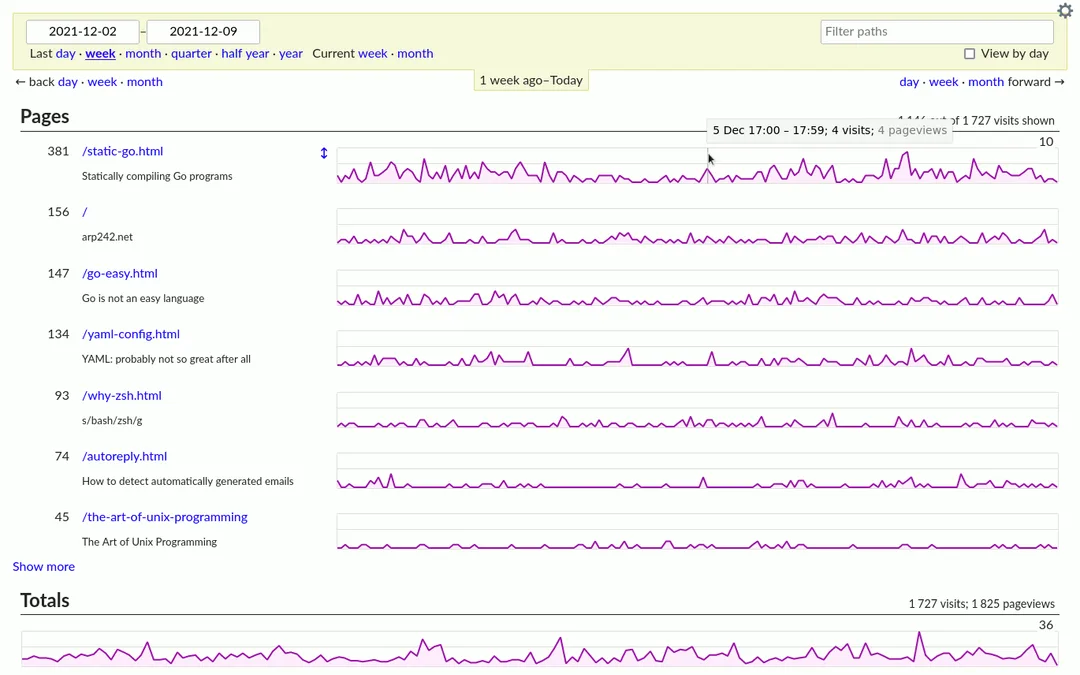
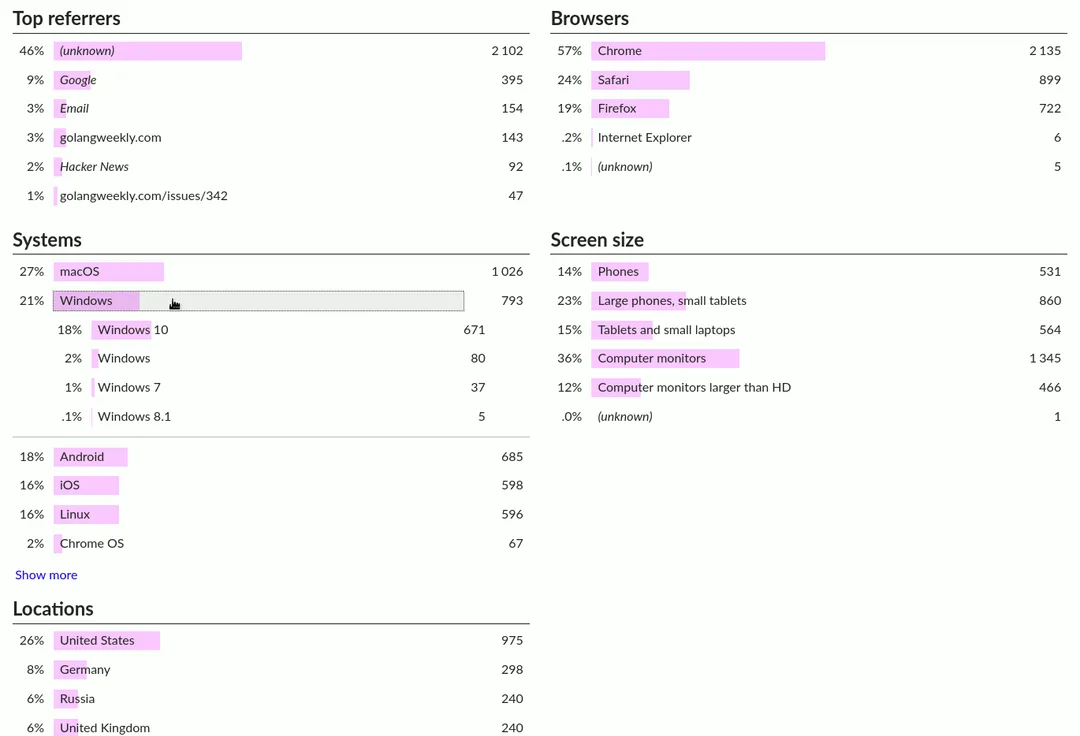
Once data starts flowing in, your GoatCounter dashboard will show:
- Total pageviews and unique visitors over time
- Top referring sites and campaigns
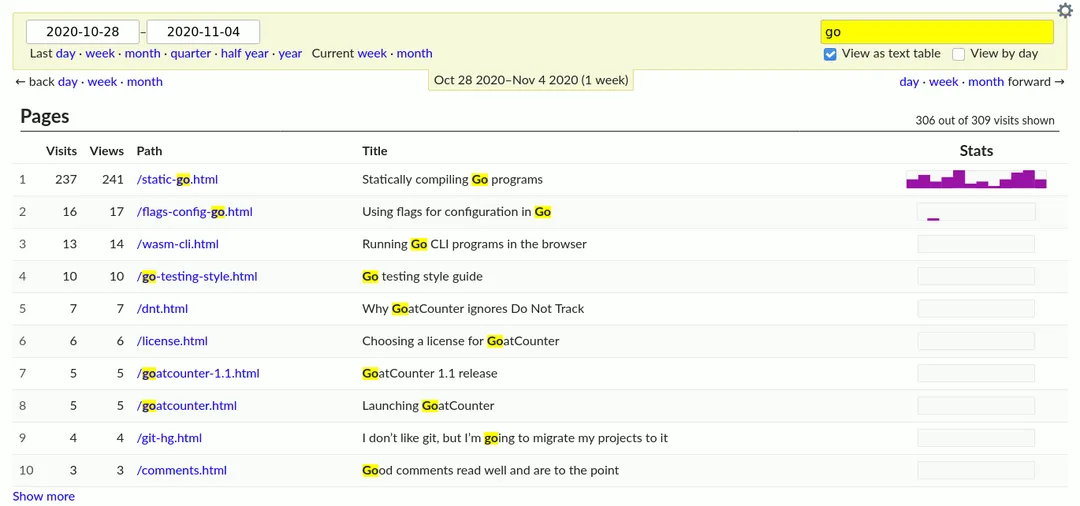
- Most visited pages
- Browser and device breakdowns
- Location data at a country/region level
Self-Hosting GoatCounter: A Quick Overview
If you want full data ownership or need the API without paying for a hosted business plan, self-hosting is worth a look. GoatCounter ships as a single Go binary with SQLite as the default database, so there is no complicated stack to assemble. Many developers run it comfortably on a basic $5 VPS, and an official Docker image plus a community Helm chart make it workable for Kubernetes setups too, if your team is already there.
The GoatCounter source code is on GitHub if you want to inspect it before committing to the route.
Self-hosting makes the most sense for businesses with in-house technical support or an existing server they are already paying for. For everyone else, the affordable hosted plan is usually the faster, lower-maintenance route.
GoatCounter vs Other Privacy-Focused Analytics Tools
| Feature | GoatCounter | Plausible | Umami |
|---|---|---|---|
| Cookie-free tracking | Yes | Yes | Yes |
| Script size | ~3.5KB | Under 1KB | Small |
| Self-hosting | Very easy (single binary) | Moderate | Moderate |
| Dashboard design | Basic, functional | Polished | Modern |
| Custom events | Yes | Yes | Yes |
| API access | Self-host only for free | Included | Included |
| Best for | Bloggers, indie sites, docs, small business | Businesses wanting polish | Developers wanting modern UI |
If you value the absolute lightest footprint and do not mind a plainer dashboard, GoatCounter wins. If a more polished interface and richer feature set matter more to your team, compare Plausible or Umami before deciding.
Practical Tips for Business Owners Using GoatCounter
- Track your call-to-action buttons. Use custom events on “Book Now,” “Call Us,” or “Get a Quote” buttons so you know which pages actually drive action, not just traffic.
- Check referrer data monthly. This tells you which marketing channels, whether it is a local directory listing, social post, or Google search, are actually sending visitors.
- Pair it with local SEO tracking. GoatCounter shows you the traffic, but combining it with search visibility efforts (Google Business Profile, local keyword rankings) gives you the full picture of how customers find you.
- Do not over-interpret location data. GoatCounter’s location tracking is broad, at the country or region level, not the precise personal tracking you would get from more invasive tools. Use it for general trends, not individual visitor profiling.
- Revisit your setup after a redesign. If you update your website theme or migrate platforms, double check the tracking script survived the change. It is a common reason analytics suddenly go quiet.
The GoatCounter help pages and why page are worth a read if you want the full reasoning behind its privacy-first design.
If you want to go deeper on turning visitor numbers into actual growth, our guides on SEO metrics beyond rankings and making your business site visible to AI are a good place to start.
WATCH: Web Analytics Without the Creepy Tracking With GoatCounter!
Key Takeaways
- GoatCounter is an open source, privacy-friendly web analytics tool available as a free hosted service for non-commercial use, a paid hosted plan for businesses, or a self-hosted option.
- It does not use cookies or track personal data, which typically removes the need for a GDPR cookie consent banner.
- Setup takes minutes: create an account, copy the tracking script, paste it into your site’s header or footer, and verify it is logging visits.
- It supports custom event tracking, useful for monitoring button clicks like “Call Now” or “Get a Quote.”
- GoatCounter is intentionally minimal. It is ideal for bloggers, small businesses, and indie sites, but lacks funnels, deep segmentation, and e-commerce attribution found in more advanced tools.
- Self-hosting is straightforward thanks to a single lightweight Go binary, making it a low-cost option for businesses with basic server access.
- Pairing clean analytics with a solid local SEO and website strategy gives business owners the full picture of how customers find and interact with their site.
Conclusion
For anyone tired of fighting a heavyweight analytics interface just to answer a basic question, GoatCounter delivers exactly what it promises: clean, privacy-friendly traffic data with a setup that takes minutes. It is not the right tool for every business. If you need deep conversion funnels or granular audience segmentation, you will outgrow it. But for positioning GoatCounter’s own docs describe a tool focused on simplicity, and for the majority of small business sites, that simplicity is the whole point.
Numbers on a dashboard are only useful if someone is acting on them. If you want your website and local SEO wired up so the traffic showing up in GoatCounter keeps growing, teams like the F9XR Team specialize in website development, website redesign, and local SEO strategy.
How the F9XR Team Can Help
Setting up analytics is one piece of a bigger puzzle. Knowing your traffic numbers only matters if your website is actually built to convert that traffic into customers. The kinds of services that close that loop include:
- Website development and website redesign built around real user behavior, not guesswork.
- Local SEO so the traffic showing up in your analytics dashboard keeps growing month over month.
- Digital presence strategy that ties analytics, search visibility, and site performance into one clear plan.
Produced using AI-assisted research and drafting workflows, then reviewed and edited by the F9XR editorial team. See our Editorial Policy for how we create and verify content.
Further Reading
Related Questions

Keywords
Copyright
© 2026 F9XR Team. Licensed under the Creative Commons Attribution 4.0 International License (CC BY 4.0). You are free to share and adapt this work with attribution to the F9XR Team.
Disclaimer
This article reflects the experience and opinions of the F9XR Team and is provided for general informational purposes only. It is not professional legal, financial, or medical advice. Metrics and results mentioned are illustrative and not guaranteed.
F9XR/Articles, published by the F9XR Team, delivers high-quality marketing content produced by staff and contracted experts, unless otherwise noted. This commitment to quality ensures comprehensive coverage of industry topics from a trusted team of writers. For more information, please visit the F9XR Team website or reach out through the contact page.
Ready to Build a Stronger Digital Presence?
The F9XR Team helps business owners turn websites into conversion engines. From website development and redesign to local SEO and AI-powered visibility, we engineer systems that bring in results, not just traffic.
Comments